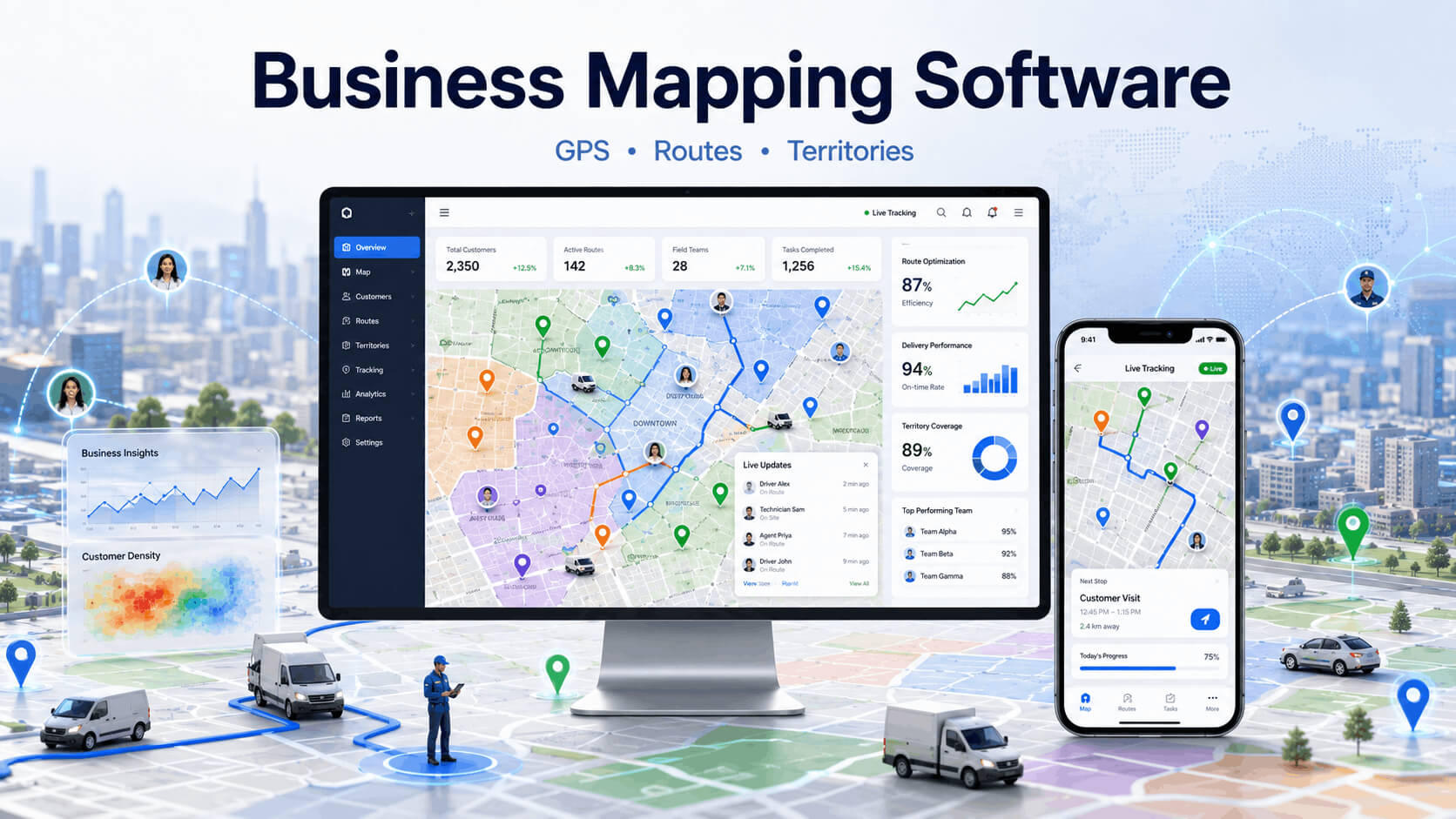
Mapping software for business is a digital tool that lets companies visualize, manage, and analyze location-based data on interactive maps. It helps teams make smarter decisions about territories, customers, routes, and market opportunities. Many people now search what is mapping software for business because they want simple answers to these daily problems. This software turns raw addresses into clear pins, lines, and colors on a map. Plain and simple, it brings everything into one easy picture.
Running a business without clear maps feels like driving with your eyes closed. Customers live all over the place. Field teams disappear for hours. Managers sit and wonder who is where. Territories overlap and cause fights. Fuel bills climb higher every month. You know how frustrating it gets when everything stays hidden in spreadsheets.
Businesses of all sizes use business mapping software these days. A small delivery company can track three vans just as easily as a big firm handles fifty. The tool works on phones, tablets, and computers. Data flows in real time. Decisions happen faster. Teams waste less time. That is why so many owners now look closely at business location mapping software.
Table of Contents
Why Businesses Use Mapping Tools?
Companies need strong location visibility more than ever before. Old paper lists and basic spreadsheets no longer work well. Customers expect quick service. Competition stays tough.
Teams manage field operations efficiently when they see live maps. Faster decision-making using maps becomes normal. Real-time business coordination keeps everyone on the same page. No more surprise delays or missed visits. Managers sleep better at night knowing the full picture.
How mapping software helps businesses is clear. It removes guesswork. You see problems before they grow big. Sales go up. Costs go down. Workers feel supported instead of lost. This kind of clarity changes everything for growing companies.
How Business Mapping Software Works?
Business mapping software collects addresses and data from your files or CRM. It then puts everything on an interactive map.
GPS and live location tracking show exactly where each person is right now. Customer and route visualization makes patterns easy to spot. Task assignment through maps lets you drag and drop jobs to the right team member. Cloud-based access for teams means updates reach everyone instantly, even when they are on the road.
The system uses geolocation tracking and real time mapping. Information updates automatically. You do not need to refresh the page again and again. This smooth flow makes daily work much less stressful.
Main Features that Businesses Need Everyday
Good business location mapping software comes with practical tools that solve real problems. Companies love these features because they make work easier every single day:
- Live team location tracking shows staff positions instantly and helps managers stay updated throughout the day
- Customer mapping dashboard puts clients right on the map so teams can see their locations clearly
- Route planning software builds smart paths automatically while considering traffic and time windows
- Territory management tools divide areas fairly and balance workload across all team members
- Reporting and map analytics turn data into clear insights that support better business decisions
These features work together nicely. They give full operational visibility.
1. Live Team Location Tracking
Field team tracking software shows every team member on the map in real time. You monitor route movement and catch delays early.
GPS mapping software for business delivers live location monitoring and workforce tracking. Managers know if someone faces traffic or finishes early. This feature brings peace of mind. Teams stay safe and accountable without feeling spied on.
You get clear updates all day long.
2. Customer Mapping Dashboard
Customer mapping software puts all clients directly on the map. You organize customer clusters by region, city, or even street.
This supports strong map based customer management. Sales people see nearby prospects easily. Service teams plan visits without backtracking. Map visualization tools make the whole process simple and fast.
- View customer locations at a glance and understand their distribution across different regions easily
- Spot dense areas quickly to focus your sales and service efforts where they matter most
- Plan visits by proximity and reduce unnecessary travel time between multiple customer sites
3. Route Planning And Scheduling
Route planning software builds smart paths for multiple stops. It considers traffic, distance, and time windows.
Business route optimization cuts travel time and fuel usage in a big way. Drivers finish more deliveries every day. Delivery route planning becomes automatic instead of manual guesswork. Many companies report big savings after they start using it.
- Create multi-stop routes in minutes while automatically avoiding traffic and busy areas
- Avoid traffic and delays by getting intelligent suggestions based on real-time conditions
- Save fuel every single trip and complete more deliveries with the same number of vehicles
4. Territory Management Tools
Sales territory mapping software helps divide areas fairly. It prevents overlap between teams and balances workload.
Strong customer territory management and territory planning keep everyone productive. Sales mapping tools show performance by zone. Managers adjust boundaries when business grows or changes.
- Balance team workloads easily so every member gets a fair and manageable territory
- Prevent territory fights by creating clear boundaries that everyone can see on the map
- Grow zones as business expands without creating confusion or overlap between teams
5. Reporting And Map Analytics
Location analytics turn map data into simple reports. You measure travel efficiency and study team productivity by area.
Location intelligence software highlights top regions and weak spots. Heat maps show busy areas clearly. These insights help leaders make confident choices month after month.
- Track daily performance easily with visual data that clearly shows team activity
- Generate visual reports fast to share important insights with management and stakeholders
- Find growth opportunities quickly by identifying high-potential areas on the map
Industries Using Mapping Software
Different sectors now depend on location intelligence software for daily success. Each industry finds its own big wins.
1. Logistics And Delivery Companies
Logistics mapping software and crm for logistics companies work wonders here. Dispatch coordination runs smoother than before. Fleet monitoring keeps vehicles on track.
Best mapping software for logistics companies improves dispatch management and on-time rates. Drivers follow optimized paths. Customers receive accurate updates. Map based crm for delivery businesses ties everything together nicely.
- Assign jobs to nearest drivers quickly and reduce waiting time for customers
- Track fleets in real time to know exact vehicle locations and status at any moment
- Improve delivery success rates with better planning and faster response to issues
2. Field Sales And Marketing Teams
Business mapping software for field sales changes how teams work. Customer visit planning becomes strategic. Territory coverage management improves week after week.
Sales people spend more time selling and less time driving. Sales mapping tools show hot zones and gaps clearly.
3. Supply Chain Management Firms
Map based crm for supply chain management offers great visibility. Warehouse and shipment monitoring happens in one place. Multi-location coordination feels easy.
Logistics operations run better when everyone sees the same live map. Delays get fixed faster.
4. Home Service Businesses
Plumbers, electricians, and repair teams love gps customer tracking software for teams. Technician tracking helps managers assign the closest person. Faster customer response times lead to higher satisfaction and more reviews.
Handyman business location tracking crm software records visit history automatically. Owners know exactly what happened at each job.
- Send nearest technician fast to reach customers quicker and improve satisfaction
- Record visit proofs easily with photos and timestamps directly from the field
- Keep customers happy by providing accurate arrival times and reliable service
5 Benefits Of Mapping Software Systems
The advantages appear clearly once you start using the tools.
1. Better Route Optimization Results
Route optimization and customer mapping software reduces delivery delays significantly. It improves operational speed for the whole team.
Fuel bills drop. Drivers feel less tired. More jobs get completed every shift. These small daily wins add up fast.
- Cut travel time by up to 30% and finish more work within the same working hours
- Complete more jobs daily without hiring extra staff or adding new vehicles
- Reduce driver stress by giving them clearer routes and better daily schedules
2. Improved Customer Service Quality
Teams send faster service updates. Customers receive accurate estimated arrival times. Trust builds when promises are kept. Happy customers come back and bring friends.
- Share live ETAs easily so customers always know when to expect service
- Reduce missed appointments through better planning and real-time adjustments
- Build stronger customer trust by delivering on time and keeping them informed
3. Lower Fuel And Travel Costs
Unnecessary trips get minimized through smart planning. Resource allocation improves. Money saved on fuel can be used for growth or better salaries. Many businesses see 20-30% savings within months.
- Lower monthly fuel bills by removing inefficient and overlapping routes
- Use vehicles more efficiently and extend their life with smarter usage
- Save money for other needs like marketing, equipment, or staff bonuses
4. Better Team Accountability
Business location tracking crm software tracks completed tasks easily. Managers review employee movement history when needed.
Workforce tracking creates fairness. Good performers get recognized. Issues get spotted and solved quickly.
- Know who finished jobs and verify task completion with clear location data
- Review movement history to understand daily activities and improve planning
- Reward top performers by identifying who consistently delivers excellent results
5. Smarter Business Decisions
Location analytics and operational visibility guide better choices. Leaders identify high-performing territories. They spot new market opportunities early.
Data-driven decisions replace gut feelings. Companies grow faster with fewer mistakes.
- Spot high value areas where your business performs best and has most potential
- Plan expansion wisely by using real location data and customer patterns
- Make confident choices based on clear visual insights instead of guesswork
Difference Between CRM And Mapping
Traditional CRM systems have clear limits. They lack visual customer tracking. Territory management feels harder without maps. Reports stay in long lists that are tough to understand.
Map based crm solves these problems. It delivers visual customer relationship management and location-driven workflow automation.
CRM with mapping features combines contact details with powerful maps. This combination works especially well for field businesses. You get map based crm for delivery businesses that actually helps on the road, not just in the office.
Choosing The Right Mapping Platform
Smart buyers check several important points before they choose.
Scalability For Growing Businesses
The platform should offer multi-user support. Flexible business expansion keeps options open. You start small and grow without changing systems later.
- Add more users anytime as your team and business continue to grow
- Expand territories smoothly without any major system changes or disruptions
- Grow without extra hassle and keep all your historical data safe
Mobile Access For Field Teams
Android and iOS compatibility matters a lot. Remote work management becomes easy. Field staff update jobs from their phones even without strong internet.
- Work from any phone whether it is Android or iPhone devices
- Update tasks on the go even when you have limited internet connection
- Stay connected anywhere and never miss important updates from the team
Why Location CRM is a Smart Choice?
Location CRM stands out as powerful business location mapping software. It brings map based crm capabilities together with strong route planning and GPS tracking.
Cloud synchronization features keep data fresh across all devices. Task and workforce management tools help daily operations run smoothly. The platform was designed specifically for logistics and field teams. Many companies pick it as their favorite mapping software for route management. It combines crm with mapping features that other tools often miss.
Future of Business Mapping Software
The future looks bright and full of new possibilities. AI-powered route planning will suggest even better paths. Predictive location analytics will forecast busy periods.
Automation in logistics operations will grow quickly. Smart territory allocation will balance workloads automatically. Real time mapping will become faster and more accurate. Companies that adopt these advances early will enjoy clear advantages over competitors.
Final Thoughts On Mapping Software
Businesses shift to map-based operations because they see real results. Mapping software for business delivers long-term operational advantages that are hard to ignore.
Location visibility has become essential in modern business. Companies that use these tools serve customers better, save money, and keep teams motivated.
The change does not need to be scary or expensive. Start with one team or one feature. Watch the improvements. Then expand step by step.
Ready to bring clarity, speed, and control to your operations? Location CRM offers a practical way to get started with business mapping software that actually fits field work. Many businesses like yours already made the switch and wonder why they waited so long.
Give your teams the visual tools they deserve. Better routes, happier customers, and stronger results wait just ahead. Take the first step today toward smarter location management.
FAQs
What is mapping software for business?
Mapping software helps businesses visualize customers, teams, routes, and territories on interactive maps for better planning and faster decisions.
How does business mapping software improve operations?
It provides real-time visibility into teams, routes, and customers, helping reduce delays, improve productivity, and lower costs.
Can mapping software track field employees in real time?
Yes. GPS tracking shows live team locations, helping managers monitor progress, assign tasks, and improve accountability.
What industries benefit most from business mapping software?
Logistics, field sales, home services, supply chain companies, and delivery businesses benefit from location-based visibility.
Why should businesses use a map-based CRM?
A map-based CRM combines customer data with location intelligence, making it easier to manage field operations and customer visits.